
Brooks Bishop — August 7, 2012
I was lately asked if I had ever done a breakdown on the memory usage in Aeternum (via Daniel Dobson).
The answer is a hearty and emphatic yes. I’ve been watching memory usage on Aeternum from the very beginning, because I had a very strong hypothesis that managing upwards of 2000 scripted collision particles (aka bullets) on screen simultaneously could be a potential bottleneck. So memory has been a concern of mine from the beginning with this project.
The best tool for the XNA platform for keeping tabs on these problems is of course, the .NET CLR Profiler. Every XNA developer out there that’s used it knows what I’m talking about, and to everyone who hasn’t, I can only say “Learn to utilize the profiler, and you’ll love it.”
So here’s a snapshot of a brief amount of time somewhere in stage 1 of Aeternum, as viewed by the memory allocations portion of the profiler.
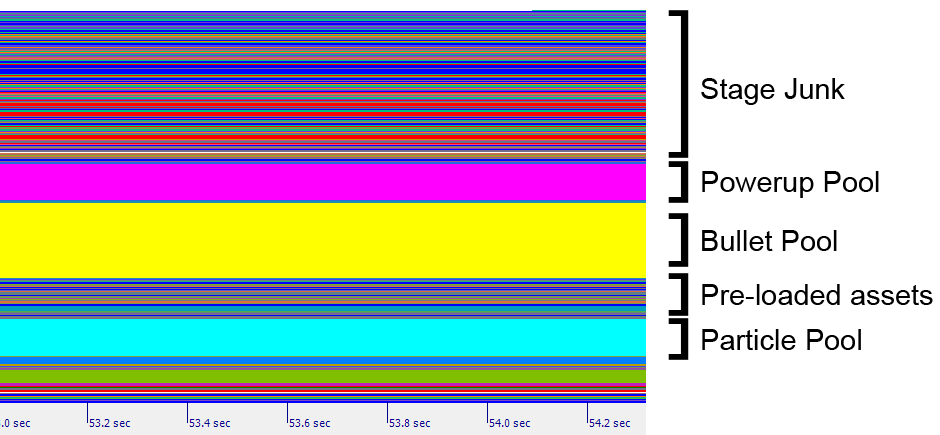
This graphic points out three strategies I’ve used to help avoid unnecessary garbage collection overhead. To put it in scale, that entire heap is about 2 MB
1. Identify assets that persist throughout the entire game, load them and keep them.
You’ll notice very early on I load in a few assets that persist through the lifetime of the game. This is mostly for fonts, some UI elements, and player character assets. No reason to throw them out if they’re just going to always be reloaded a second later.
2. Adopt a very aggressive pooling strategy.
The most important aspect in the case of Aeternum was to develop techniques for pooling entities. Particles, bullets and powerups are all initialized early on, and recycled. The fact these discrete components are each in contiguous parts of memory probably doesn’t hurt when it comes to accessing them for updates every frame either.
3. Learn when to stop caring about garbage.
I read a lot of developers who stress about garbage collection. And yes, if you make a few mistakes, do too many unnecessary allocations or forget to release references for example garbage collection can destroy your frame rate. However the strategies I have adopted for managing long term vs potentially volatile assets have mitigated the bulk of this problem in my case. This has left me in the position of being able to create my stage content without really thinking too much about dealing with collection problems. Looking at the graphic again, you’ll see at the top all the junk that had built up on the heap over the course of the stage. Most of that had already gone out of scope by this point and is ready to be collected. In actual practice the heap garbage that builds up over the course of the stage usually doesn’t ever trigger a collection. Instead I hold off until a stage change and initiate a collection manually, leaving the persistent components in memory and cleaning up the rest of the space for the new stage. I also hide the frame hiccup there because the screen fades to black between stages anyway.
In conclusion, I can’t definitively say if these are best practices or not. I can only say that from what I’ve seen, these things have worked for me. The game runs great, even with all the bullets and particles flying around.